How to create a product roadmap, with live examples
Short answer: a product roadmap shows what you're building and roughly when. To create one: decide who it's for, group the work into themes, place each item in Now, Next or Later, add one line on why it matters, and share it somewhere you can keep it current. You can ask Claude or ChatGPT to draft it as a web page in a minute, then publish it on a link your customers can open.
On this page
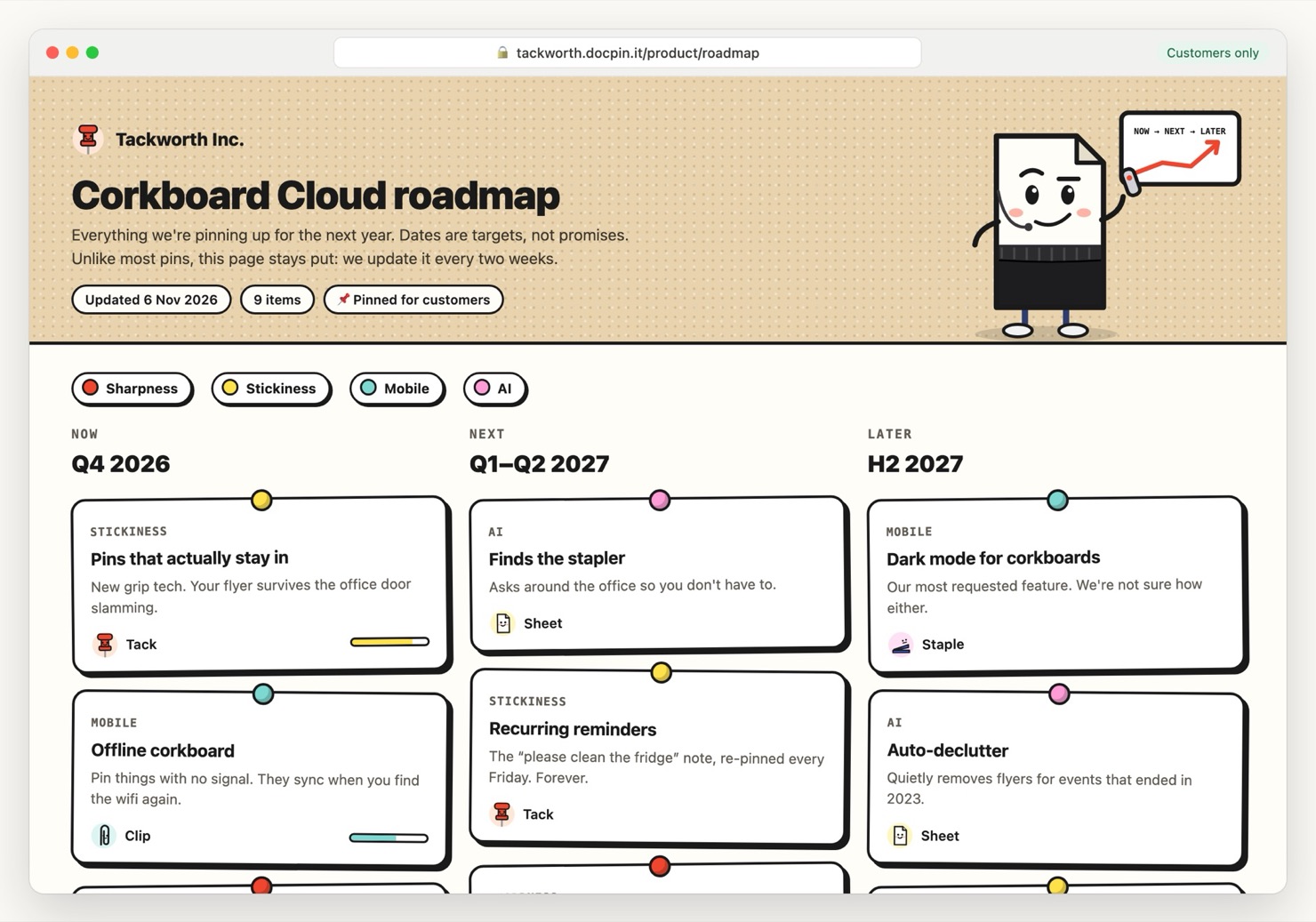
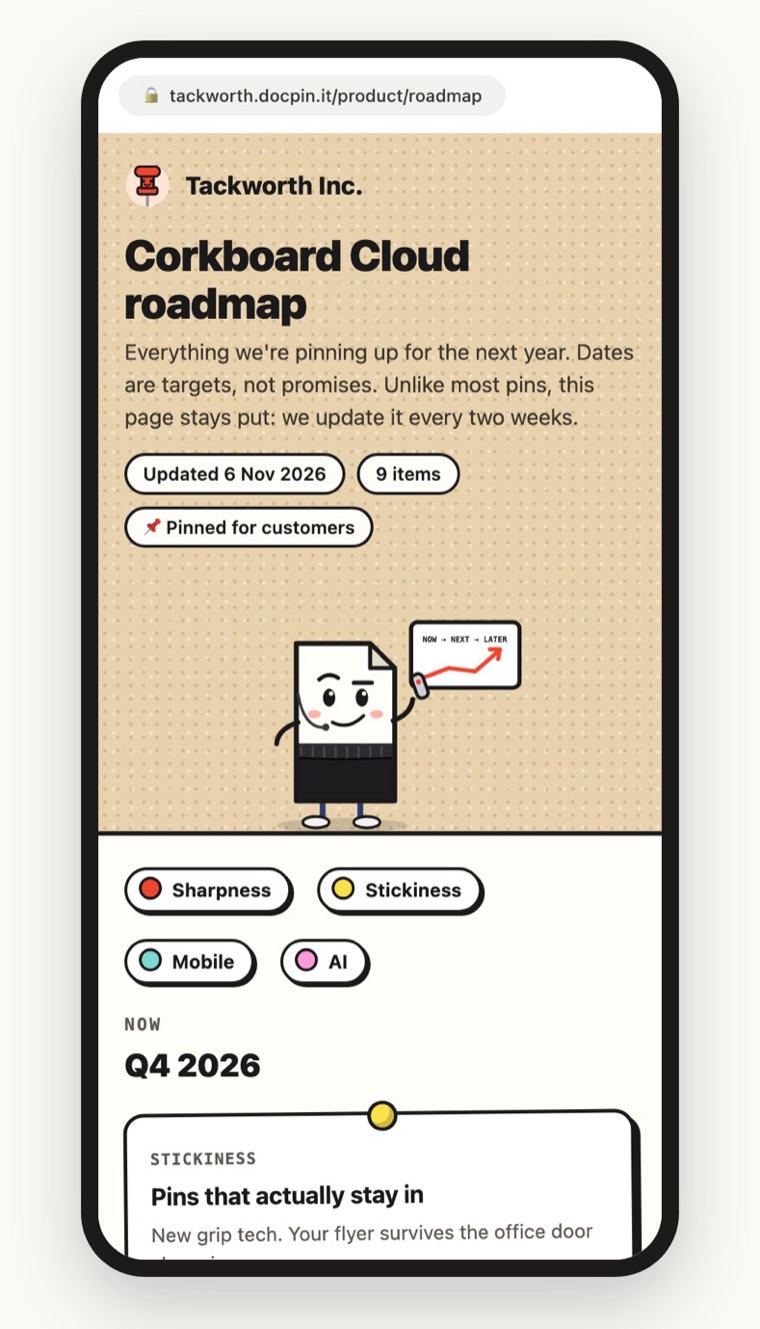
A customer-facing roadmap made with Claude and published with DocPin. Each column is a time horizon; colours are themes.
What a product roadmap is (and isn't)
A product roadmap is a plan for where a product is going: the problems you'll solve, in what order, and roughly when. It is not a release schedule or a backlog. A backlog lists every task; a roadmap shows the handful of outcomes that matter, so a customer, a salesperson or an investor can understand it in a minute.
How to create a product roadmap in 6 steps
- Pick the audience firstA roadmap for your engineers and one for customers are different documents. Decide who will read it, because that decides how much detail and how many dates to show.
- Group the work into 3–5 themesThemes are the outcomes customers care about, like “Scheduling” or “Payments”, not team names. Give each a colour so readers can scan.
- Use Now, Next and Later instead of exact datesNow is what you're building this quarter, Next is the following one or two, Later is the rest of the year. It's honest about uncertainty, and you won't be held to a date you guessed.
- Write one line on why each item matters“Offline job notes: write notes with no signal; they sync later” tells a customer more than a feature name ever will.
- Show progress on what's in flightA simple bar or status on Now items shows the roadmap is alive, not a wish list.
- Publish it, and say when it was updatedA roadmap in a slide deck is out of date the day after the meeting. Put it on a link that you update, and show “Updated 6 Nov” at the top.
Make it with Claude or ChatGPT
AI is good at turning a messy list of features into a clean, visual roadmap. Paste your list and ask for a single web page:
Ask for changes the same way: “move Dark mode to Next”, “make the AI theme purple”. When it looks right, publish it.
Share it on a link your customers can open
With DocPin connected to Claude or ChatGPT, publishing is one more message:
Every update goes behind the same link, so the link in your help centre, your sales emails and your customers' bookmarks never breaks. Earlier versions are kept, so you can see what the roadmap said last quarter.
- Public, a password, or only certain emails or companies
- See who opened it, and when
- Your own domain on Pro, like roadmap.yourcompany.com
Product roadmap examples to copy
- Now / Next / Later (the example above): best for public roadmaps and fast-moving teams.
- Quarterly timeline: columns per quarter, for teams that plan in quarters and share with leadership.
- Theme swimlanes: one row per theme, items left to right by time. Good when you have several product areas.
- Outcome roadmap: each item is a goal with a metric (“cut time to invoice to 1 day”), not a feature. Popular with product leaders.
Ask your AI for any of these by name: “turn this into theme swimlanes by quarter”.
Mistakes that make roadmaps useless
- Exact dates on everything. You'll miss some, and customers remember.
- Too much detail. If it needs scrolling for a minute, it's a backlog.
- No owner and no update date. Readers can't tell if it's current.
- A PDF in an email. It's out of date by next week, and you can't see if anyone read it.
About the examples: Tackworth Inc., Pushpin Supply Co., Paperweight Studio and Staple Theory are made-up companies from the DocPin universe, starring Sheet, our mascot, and friends. Your page uses your own brand, not ours.
Questions people ask
What should a product roadmap include?
Three to five themes, the items under each placed in Now, Next or Later, one line on why each item matters, progress on items in flight, and the date it was last updated.
Can ChatGPT create a roadmap?
Yes. Give ChatGPT or Claude your list of features and ask for a product roadmap as a single HTML page with Now, Next and Later columns. You can then publish it to a link with DocPin.
What's the difference between a roadmap and a backlog?
A backlog lists every task the team might do. A roadmap shows the few outcomes that matter and roughly when, so someone outside the team can understand it in a minute.
Should a public roadmap have dates?
Usually not exact ones. Now, Next and Later, or quarters, set expectations without committing to dates you might miss.
How do I share a roadmap with only some customers?
Publish it with DocPin and limit it to people at those companies' email domains, on Pro. They confirm their email with Google or a sign-in link, and you can see who opened it.
Got a page to send?
Put it on your own link in a minute. Free for 3 pages, no credit card.
Start freeSources, checked 8 November 2026:
- Example page: Corkboard Cloud roadmap (Tackworth Inc. is made up)
- DocPin: Publishing from Claude, ChatGPT and Cursor